



Smash Karts Game
4.8

Slither.io
5

2v2.io
5

Kart Wars
5

Poxel.io
5
Kart Bros
5

1v1.LOL
5

Veck.io
5
Go Kart Boost Playground





























Meowdoku
5
Go Kart Boost Playground: Silly Races You Can’t Stop Playing
Go Kart Boost Playground feels like the kind of game you try once and instantly “get.” No long learning curve, no complicated setup - just jump in, hit the gas, and see how well you can handle the track. It has that playful, slightly chaotic energy where even a bad race can still make you smile.
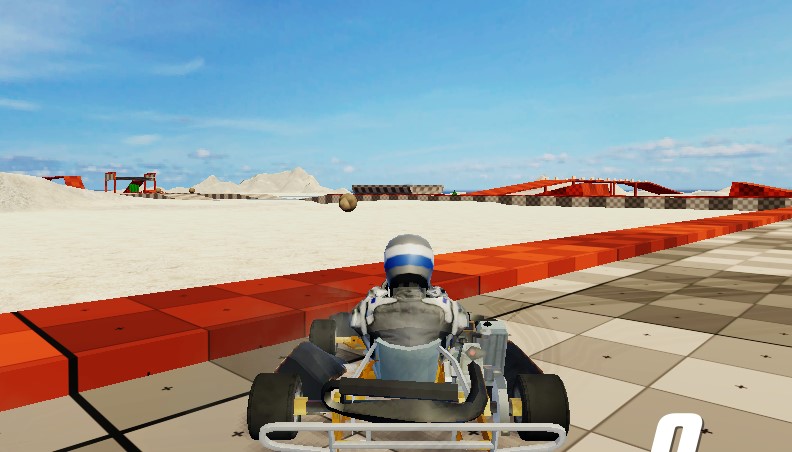
The tracks themselves are lively and full of little surprises. Some are wide and easy to navigate, while others throw tight corners and unexpected turns your way. You never really feel too comfortable - and that’s what keeps it interesting.
The Boost Makes the Difference
The boost system is where things start to get competitive. You’ll pick up boosts as you race, and they give you a quick speed burst when you need it most.
At first, you might use them whenever you get one. But after a few rounds, you’ll realize timing matters a lot more than you thought. Saving a boost for the right moment - like a straight path or right after a turn - can help you catch up or pull ahead in seconds.
Not All Paths Are Obvious
If you stick only to the main track, you might be missing out. Some races have shortcuts that aren’t immediately obvious. They can be small side routes or quick jumps that cut down your time.
Finding them isn’t always easy, though. Sometimes you’ll spot one too late, or take it and mess up completely. The trial-and-error part is fun, and it makes every race feel like an adventure.
Pick a Kart That Fits You
As you play more, you can unlock more karts. Some are faster and easier to control than others. It all depends on how you like to race.
You can also change the way your kart looks. Adding new colors and small details won't change how your kart works, but they will make it feel more like your own. It's a little thing, but it makes the whole thing better.
Getting the Hang of It
The more time you spend on the tracks, the more real everything seems. You begin to notice turns, know when to slow down, and find the best times to use your boost.
Drifting is something that takes a bit of getting used to, but it helps a lot. Once you’re comfortable with it, corners feel smoother and you don’t lose as much speed.
How to Play
You won’t need much time to learn the controls.
Mouse and Keyboard:
Arrow Keys or WASD: Control direction
Spacebar: Activate boost
Shift (or similar key): Drift
Mouse: Menu navigation
Quick Tips:
Try not to waste boosts - timing is key
Watch carefully for possible shortcuts
Use drifting to handle tighter turns
Replay tracks to improve your performance
Go Kart Boost Playground keeps things simple, and that’s exactly why it works. It's easy to learn, fun to get better at, and always ready to race again, even if it's just for a few laps.
Categories & Tags


















Discuss: Go Kart Boost Playground